Fitbit Ace

Fitbit Ace

By Google

  • Category: Health & Fitness
  • Release Date: 2024-05-28
  • Current Version: 25.1126.302
  • Adult Rating: 4+
  • File Size: 201.59 MB
  • Developer: Google
  • Compatibility: Android, iOS 16.0
Score: 4.08392
4.08392
From 143 Ratings

Description

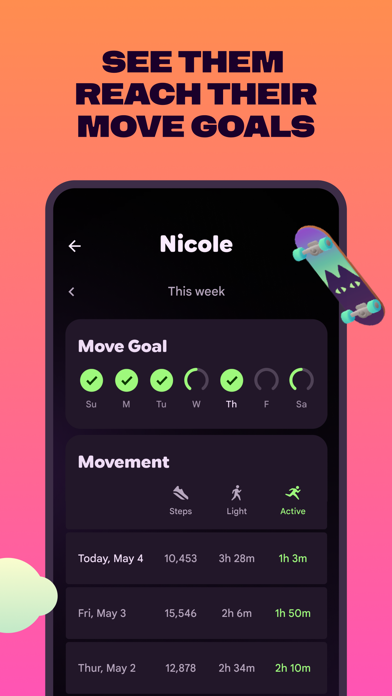
The Fitbit Ace app is your home base for the Fitbit Ace LTE kids smartwatch. Use it to securely call or text message your child, see their location, check in on their activity levels, and manage their contacts. If you’re invited as a contact, you can also use the Fitbit Ace app to securely call or send messages to a child’s Fitbit Ace LTE smartwatch. *Fitbit Ace LTE device requires a paid Ace Pass data plan. Some features only available for kids with a supervised Google Account. Learn more about privacy for Fitbit Ace at g.co/fitbitace/privacy
Screenshots

Reviews

  • Messages Lost

    1
    By Bulytko
    If you ever move to a new phone, all your message history with your kids will be lost
  • Complete waste of money

    1
    By Lena2888
    This app is absolutely useless. It doesn’t connect to the watch at all. I spent over half an hour trying every possible way to pair it, and nothing worked. Total waste of time and money.
  • Never loads on my phone.

    1
    By floofer nugget
    My little brother can call and text me but I can never open his messages because the app says it has no connection. But everything else on my phone works right. Just never this app. Horrible.
  • Erro_094

    2
    By Ba_Bella
    It was working fine until it just stopped working and said on the screen that it had to be restored. I tried to restart it, delete the account, change my wifi network to 2.4, tried with a new account and it didn't work at all. It just said that it was wrong. I ended up calling customer service and they never responded.
  • Great product but misses key functions

    3
    By transientself
    The watch is beautifully designed and so easy to use. The UX is wonderful and kids are proud and excited to wear and use it. However it is infuriating on many levels, examples include: family from outside the US can’t use the app, you can’t send pictures or any kind of media, it doesn’t have a camera, if friends of your child also have the watch there is zero way of communicating between friends. Having spent hours researching which first smart watch to buy, I’m happy with the limits and control that Fitbit Ace provides, but it lacks so much functionality, I wish I’d bought an Apple Watch straight off. imploring Fitbit Ace to update the app so that grandparents abroad can download and use it, and to allow parents to approve connections with friends so that they can text each other!
  • Too many games!!!!

    1
    By CompletelyJaded
    All I wanted was a way for my kid to contact me and keep track of his fitness. He spends so much time playing the darn games I have to take it away from him and then we forget to put it back on when he needs it! Why does it even need games. I’m currently looking for a better option. The gaming is ridiculous.
  • Pretty good

    4
    By Foodservice Foil
    I like it but it doesn’t work in Canada and I can’t text or call my friends on the watch
  • Amazing🤩

    5
    It functions well, my kids feel really independent and comfortable. It is working well too. We are doing these family quests a lot!🤩
  • Great watch for younger kids

    5
    By lazyperson
    My daughter loves the ability to reach us after school and can even reach trusted adults through this app. It makes coordinating with parents of friends the watch particularly easy because they always have the watch installed for their own children. Location tracking is great for peace if mind. The wallet function also allows kids to pay for their own things at stores that take Google Pay.
  • Amazing!!!

    5
    By ProMisssh
    The Fitbit Ace LTE is a great way for kids to manage their own calling while still having you help them. My kid is always staying connected with me and I am always looking out for him. Fitbit Ace LTE is the BEST!!!!!!

keyboard_arrow_up