Acuity Scheduling

Acuity Scheduling

By Squarespace, Inc.

  • Category: Business
  • Release Date: 2017-06-30
  • Current Version: 70.0.0
  • Adult Rating: 4+
  • File Size: 198.89 MB
  • Developer: Squarespace, Inc.
  • Compatibility: Android, iOS 16.0
Score: 4.80457
4.80457
From 27,146 Ratings

Description

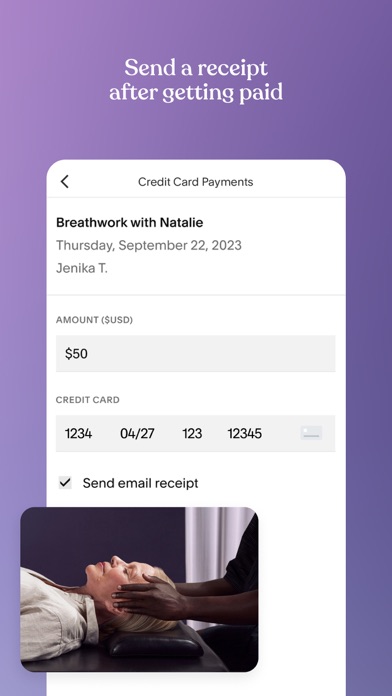
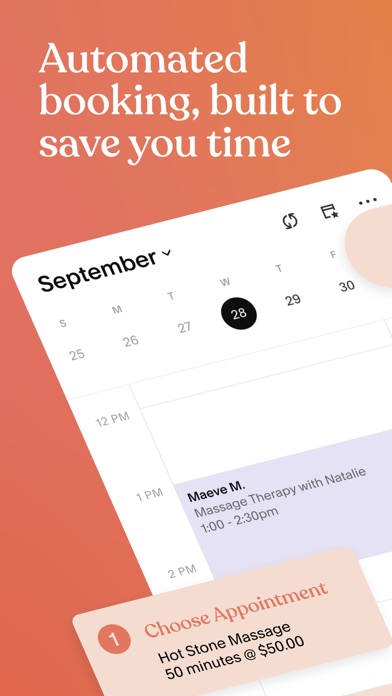
With seamless client scheduling, appointment notifications, secure mobile payments, and automated receipts, the Acuity Scheduling app helps you manage your calendar and clients. Run everything from the app while you’re on the go, with a client, or in your shop with these tools: Calendar Management: - Check your real-time schedule - Edit your availability - Schedule new appointments - Share direct scheduling links with clients - Sync your calendar Client Management - Keep track of appointments with push notification alerts and reminders - Manage your client list and update client notes Payments - Manage secure payments and invoices - Send mobile payment links - Send receipts - Accept tips Privacy Policy — https://squarespace.com/privacy Terms of Service — https://squarespace.com/terms-of-service
Screenshots

Reviews

  • Please add “packages, gifts, & subscriptions” to the app

    4
    By kissed by an angel
    The app would be perfect if it could do all the features the web version can do
  • Not the best

    1
    By Marygrace339
    All the scheduling features of Acuity are great. Their website is great. However, the app is quite annoying. It’s glitchy when scrolling and always takes a long time to load. Also, since they’ve partnered with square I have to log in every time I open the app? Why!!!!
  • So continuously buggy.

    1
    By Khiri2000
    I wish there were other better scheduling platforms because I always continuously run into bugs with this programs. From bugs with payment settings, bugs when adding new appts and add ons, bugs for EVERYTHING! It’s so frustrating. Do better!!
  • Five stars

    5
    By Danni poo
    I’ve been here for over 5 years and they haven’t failed me yet
  • I love the app but

    5
    By ineedhelp3z
    Is there anyway to add mass texting? I want to send multiple messages at once to multiple clients so I can announce any specials going on within my business 🫶🏼 other than that great app and so organized
  • I hate this app

    1
    By Ihatethisappmorethanlife
    I cannot for the life of me schedule or block time from my phone. I can only do it from a laptop. Every time I select a time… it bounces it to a whole different time. I’ve never had an app play so many games to the point where I cannot schedule ANY clients…. Because it refuses to allow me to select a time.
  • Disappointed

    1
    By SophiainUtah
    This app has been an absolute nightmare. There has been a number of new bugs with every release and I’ve had to speak with Support far too many times. Every time I’m giving a workaround or the option to use the web app which is extremely unintuitive when trying to navigate on mobile device especially as I have a Client right next to me trying to check out. Not sure why these issues are not being considered for fixes as well as it seems like there is no quality assurance because it is an ongoing problem. I will be taking my business elsewhere.
  • buggy all the time

    2
    By frfhuh be fr
    cant log in, cant review images my clients input, this app is so frustrating now!!
  • Glitch

    1
    By jazorocks92
    Trying to reschedule to change both day and time in an appointment is becoming a hassle. I wind up getting two rescheduling emails because it only allows one at a time. Please fix the glitch
  • Client phone numbers drop off

    4
    By milamorganstudio
    For over a year now when I book a long term client their phone number drops off the booking so I have to re-add it in order for client to get their reminder text. That means I have to always check when booking that their cell number isn’t blank. Or I lose revenue. I happened again today. The number dropped if that clients acuity schedule and he didn get reminder and had been out of town a month so he needed that reminder. It makes us look unprofessional as well. I can add email to the reminders but will those go out? I don’t like to send more than one reminder because I personally hate getting 3,5 reminded from offices. I’ve sent in this complaint several times and I’m told “send us a screen shot”. I do which shows the client name but no phone number listed but it keeps occurring. What does a screenshot show u anyway. U need to expedite this to ur engineers. It’s been three years of this and I pay top tier for acuity needing for this feature. I just rebooked a long term client and it did it again. I had to go back in and add her cell number. Most clients prefer text reminders so I don’t know if it’s happening for email. I’ve complained about this I have updated the app consistently. . Follow up: I have not had great CS response. They still ask for a “ screen shot” of the problem so I’ll show the reminder text number is missing but a screen shot of missing cell number doesn’t give them info really. But it has continued to occur. Why has this not been fixed? I’ve been a client for 13 years when acuity was owned by acuity nor Squarespace. I need this issue fixed. Clients who need reminder have missed sessions which cost me money. A lot of money. CS was stellar when acuity owned the app but now I’ve been ignored by Squarespace and there’s been no change. In about ready to find a new scheduling system which is not the answer I wanted. Pls address this issue and fix it. I’ve sent “screenshot” but as u can imagine it’s not going to give info except show blank space in cell number spot. Pls fix or I’ll b leaving. Doesn’t seem like u care.

keyboard_arrow_up