
Day One

Day One

By Bloom Built Inc

  • Category: Lifestyle
  • Release Date: 2016-02-04
  • Current Version: 2026.1
  • Adult Rating: 4+
  • File Size: 46.62 MB
  • Developer: Bloom Built Inc
  • Compatibility: Android, iOS 15.0

Description

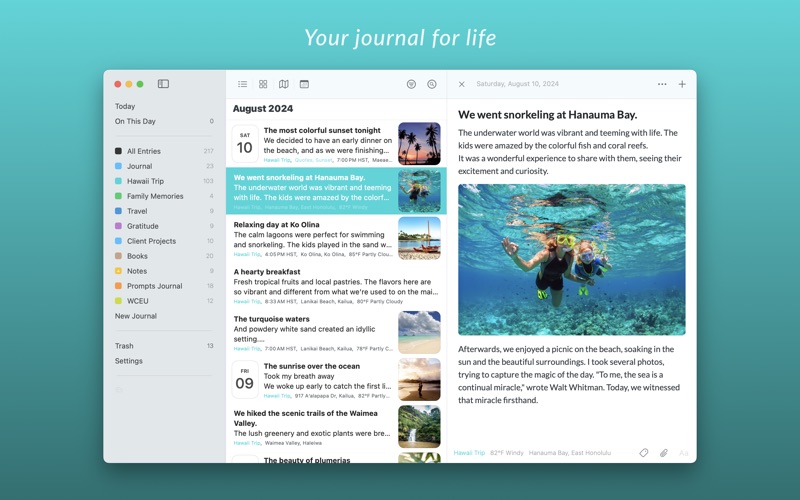
Apple’s App of the Year with over 15 million downloads and 200,000 5-star ratings globally, Day One has reinvented journaling letting you record your life as you live it. Securely save audio, video, photos, notes, and more in the world’s most trusted digital journal. “Day One creates something so rare it feels almost sacred: A completely private digital space.” – New York Times “Day One makes keeping a journal delightfully easy.” – Wired “This superb journaling app remains pleasant to behold, easy to use, and a tough act for any rival to follow.” – Macworld WHY DAY ONE? Day One is the original journal app and a decade of updates and feature additions make it the most private, trusted, and easiest-to-use journaling platform in the world. SIMPLE TO USE, EASY TO LOVE • Beautiful, award-winning design • Unlimited text entries • Unlimited photos and videos* • Powerful rich text formatting with markdown • Different journals for every aspect of your life* PRIVATE AND SECURE • Automatic backups keep your journal entries safe • End-to-end encryption, which is a fancy way of saying your entries are 100% private • Journal entries stay secure with passcode or TouchID • Export options (pdf, plain text, JSON, etc.) ensure your entries always stay yours FORM A HABIT & STAY CONSISTENT • Programmable reminder notifications • Unique, daily journal prompts help eliminate writer’s cramp • Customizable templates save time and add organization to entries • Today view provides a summary of where you’ve been and what you’ve done JOURNAL FROM WHEREVER, WHENEVER • Cross-platform apps available on iPhone, Apple Watch, iPad, and Mac • The ability to email entries straight to your journal BUILT FOR REMINISCING • On This Day feature allows you to revisit past memories • Tags, favorites, and search filters make it easy to find what you’re looking for • Map view quickly shows all the places you’ve journaled from *Day One is FREE to use forever with unlimited entries. Additional features, including unlimited photos, videos, and sync are available with a Day One Premium membership. Start a free trial today. Privacy Policy: https://dayoneapp.com/privacy-policy/ Terms of Use: https://dayoneapp.com/terms-of-use/ For technical assistance or other inquiries: https://dayoneapp.com/contact/
Screenshots

Reviews

  • Use all the time

    5
    By Anne Smiles
    I LOVE DayOne for journalling, especially since I can add pictures and that it syncs wonderfully between my MacBook and my iPhone.
  • Using for over 12 years

    5
    By MerryhusLight
    I love Day One for the simplicity of use, having 10 journals to work in (any more would be a hassle to track), ability to include photos and a chance to review entries I have entered on the same day over the years. Day One has been with me through three dogs, two houses, a divorce, a death and a move cross country. It is kind program, but strong and ready to hold you.
  • great

    5
    By 4crazycats
    This is a great app for writing, I have used it for a few years now. I wonder how many times it will ask me to leave a review?
  • The Best

    5
    By Day One RL
    The app is exactly what is needs to be. Simple, easy to use and gets out of the way to let me capture my thoughts while also having features that can be used to quickly grab new ideas
  • Premium price, basic features

    2
    By daversion
    I was an early adopter of Day One and have seen minimal evolution over the years. Finally a great feature, “shared journal” is available. Though it is in beta, it is poorly thought through. My partner gets an alert and starts reading my journal while I’m composing. There needs to be a draft/publish feature. The commenting feature is also not available on MacOS for shared journals - so I just can’t see any comments unless I check my phone. $50/yr and it seems like a single part-time dev. I will vibe code something better in a few days. For an indy dev I’d totally understand but for the price and size of Automattic it is disappointing.
  • No logro entender.

    1
    By Papa Chale
    tengo horas de querer ver mi diario de hace 3 dias. Me parece muy poco amigable -hasta ahora, tengo esperanza de poderlo usar flluidamente.
  • I absolutely love this app

    5
    By Serene2017
    I have always struggled to keep my thoughts, diary entries, and lists organized when journaling and this makes it SO EASY. I will never use another journaling app
  • Day One and me

    5
    By CRPB03
    With fourteen active diaries for different aspects of my life, this is the most-used software I own and the lead expensive for the incredible value it brings to my productivity. Look no further than Day One.
  • This is the first app I use every morning

    5
    By KiltedPNW
    I write in my journal daily. It is the first thing I do when I sit down at my desk. My daily goal is 500 words within 30 minutes. My streak stands at 110 days and I’m loving it. With this daily routine, I have been exceeding 600 words regularly. My main computer used to be a Windows desktop. I used the David RM Journal software. That’s a great tool, but its UI is very busy and frankly became very over-engineered. When I started using Macs at my job and eventually got a personal Mac, I remembered how well respected Day One was. Before I had a personal Mac, I remember being disappointed that such an elegant tool did not exist for the PC. So when I got my Mac laptop, the first application I installed was Day One. I don’t use all of the features that are available. I don’t use daily prompts for example. I just like the minimal UI and a blank page to write in. I like that I can tag my entries and add my location with the weather. I used to have the auto location on, but the GPS is not entirely accurate and I would find my entries tagged with the wrong locations. So I turned that off and add my location manually. I would very much like to remove a lot of the saved locations, but I don’t see that as a function. That would be a great thing to add. I am rambling now I think. Suffice it to say, Day One is a great app and anyone who journals and who writes should take a look at it. Highly recommend.
  • Best journaling app around

    5
    By Sfperson780241
    I’ve tried a lot, but probably not all. And I love Day One the most. On my Mac. On the web. On my phone. It works, it’s beautiful.

keyboard_arrow_up