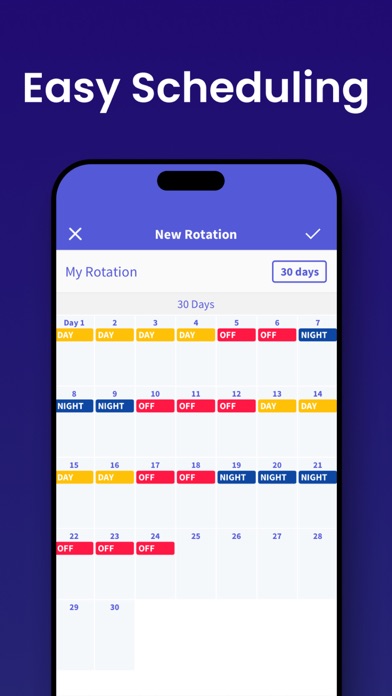
Spoke: Shift Day Work Calendar Tracking your shifts has never been easier! With Spoke, you can see at a glance when you’re working. Suitable for your iPhone and/or iPad, the clear, easily readable calendar allows you to track your working days and hours with minimal effort – you can add or remove a shift with a single tap. Designed with shift workers in mind, Spoke enables you to see a full month of shifts on the screen, making it easier than ever to manage your working life. Key features: - Color-code your shifts and assign short-names for at-a-glance insights - Intuitive rota interface for quick rotation application - Add multiple memos for quick reminders of each day’s events - Shift widget enables you to see upcoming shifts without even opening the app - Share your schedule easily with friends and family - Sync with iCloud for real-time updates across your iPad and iPhone Additional benefits: - See up to two shifts per day. - Add unlimited shifts to your calendar. - Change your shift schedule just by tapping on the calendar. - Copy and paste shifts for rapid diary updates. - Add your rotation and automatically fill the calendar in a few simple steps. - Get push notifications for shift events. - Week number with four different patterns (1-2, 2-1, 1-52, 0-51). - Set the start day of your week to any day. - Email your shift events. - Share your monthly shift view (via email/SMS/print/photo album) The intuitive shift managing interface makes Spoke suitable for anyone who wants to take the pain out of their diary management. The app is perfect for those working random hours and days, as well as individuals working fixed shifts on rotation. People already benefitting from Shift Days include: - Nurses - Doctors - Emergency workers - Police- Firefighters - Military- Paramedics - Security Guards - Cleaners - Bartenders - Reporters - Students and part timers - Taxi or Uber drivers - Waiters and waitresses - Truckers - Construction workers - Men of the Night’s Watch --- -SUBSCRIPTION PRICING & TERMS Spoke is free to download. Spoke Subscription gives you unlimited access to our premium content and features. - Spoke's auto-renewing subscription options are $2.99 monthly or $24.99 annually - This price is for United States customers. Pricing in other countries may vary, and actual charges may be converted to your local currency depending on the country of residence. - Payment will be charged to your iTunes Account at confirmation of your subscription - Subscription automatically renews unless auto-renew is turned off at least 24-hours before the end of the current period - The account will be charged for renewal within 24-hours prior to the end of the current period, and at the cost of the chosen package - Any unused portion of a free trial period, if offered, will be forfeited when the user purchases a subscription to that publication, where applicable. - Your subscription automatically renews unless you turn if off in Account Settings 24+ hours before the end of the billing period. - You can turn off auto-renew at any time from your iTunes account settings, but refunds will not be provided for any unused portion of the term. [ Privacy Policy ]https://www.iubenda.com/privacy-policy/77398254 [ Terms of Service ]https://www.iubenda.com/terms-and-conditions/77398254 [ Support ]Contact at '[email protected]'