Photo Scanner Plus

Photo Scanner Plus

By Photomyne LTD

  • Category: Photo & Video
  • Release Date: 2015-03-10
  • Current Version: 31.3
  • Adult Rating: 17+
  • File Size: 160.70 MB
  • Developer: Photomyne LTD
  • Compatibility: Android, iOS 16.0
Score: 4.78843
4.78843
From 21,690 Ratings

Description

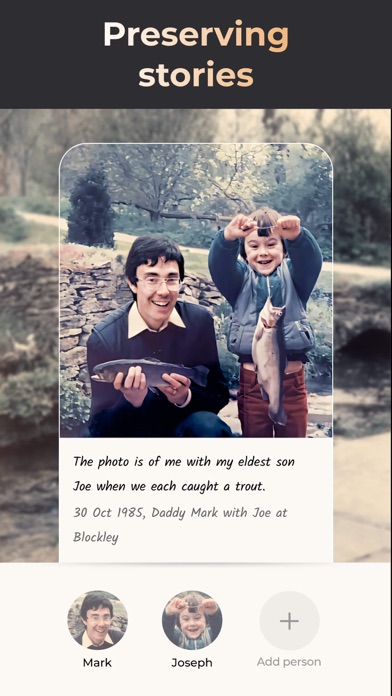
Meet the ultimate solution for preserving your old photos. Photomyne is the fastest and easiest way to turn photos, slides, negatives, and other family keepsakes into a digital library spanning generations and share them with others. Download it today to see the magic of this powerful scanning app, built with cutting-edge AI technology. This paid app version offers the full utility power of Photomyne on one iOS device. You will need to purchase a Photomyne Membership (in-app purchase) to access your photos on other devices and online and to back up your photos. SIMPLY HOLD & CAPTURE - SCANNER WILL DO THE REST * Scan multiple analog photographs in a single shot - finish an entire album in minutes. * Scan more than just photos too - film negatives, slides, documents, notes, kids' art, recipes, scrapbooks, and more. * Capture scans by tapping a button or by simply saying 'Go' (if voice control is enabled). * The photo scanner auto-detects picture boundaries, auto-rotates sideways pics, crops, restores colors, and saves them into a digital album. EDIT AND CURATE YOUR COLLECTION OF MEMORIES * Add details to albums and photos (locations, dates and names) * Name the people in the photos. * Scan the back of a photo, add audio recording * Apply color filters & colorize B&W photos * Sharpen blurry faces in photos SAVE & SHARE YOUR REDISCOVERED MEMORIES * Save photos to your mobile device or computer in the best quality (print quality) * Share as many photos as you want via a web link * Enjoy unlimited colorization of Black-and-White (monochromatic) photos * Create gifts with your scanned photos such as photo collages USE SCANNED PHOTOS TO MAKE SPECIAL EVENTS TRULY UNFORGETTABLE: * Add a dose of nostalgia to reunions * Honor memorials with photo memories * Celebrate anniversaries with old photos * Add an element of surprise to birthdays OPTIONAL IN-APP UPGRADE: To access your photos on other devices and online and to backup, consider purchasing an optional paid plan (in-app purchase). Here are the features you get with a paid plan (Photomyne Membership): 1. Access your photos on other devices and online 2. Unlimited photo backup The app offers an optional paid plan via monthly/yearly auto-renewing subscriptions**, as well as a One-Time plan which is paid for by a single upfront payment. These offer unlimited access to the premium mentioned above. **Payment will be charged to your App Store account at confirmation of purchase. Your subscription will automatically renew itself unless auto-renewal is turned off at least 24 hours before the end of the current period. Your account will be charged for renewal within 24 hours prior to the end of the current period. You can manage your subscriptions and turn off auto-renewal by going to your Account Settings in the App Store. If offered, if you choose to use our free trial, any unused portion of the free trial period will be forfeited when you purchase a subscription to that publication, where applicable. Got any questions? We’d love to connect: [email protected] Privacy Policy: https://photomyne.com/privacy-policy Terms of Use: https://photomyne.com/terms-of-use

Screenshots

Reviews

  • Cancelled my subscription and they still keep charging my card

    1
    By Kimalmac
    Canceled my subscription and they keep charging my card and tell me I have to subscribe again and pay again and they refuse to cancel my subscription on there and and get rid of my card details.
  • Does an adequate job

    3
    By auggie1
    I purchased photo mine when it was on sale to try and scan old family photos. I found it very difficult to capture the photos without glare without purchasing a lot of other accessories. The enhanced focus on the face is nice, but it does not enhance the focus on the remainder of the photograph. This results in many of the older photos looking like they have floating heads that are not in sync with the other objects in the photo. I have discovered Google photo scan seems to do a much better job at eliminating the glare.
  • Almost usefull

    1
    By ifaceunclebob
    Maybe if I was 30 years younger, I could get more accomplished. But @ 78, I’m too slow to learn more tricks especially from a tricky AI customer service that won’t call me back. Ive spent too many hours trying to work on my original email only to set up another email that resulting in me paying the full price 2 times. If I could rate their school solution, it would be an F!
  • Do not purchase!

    1
    By 2boyz1princess
    Do not waste your $ on this app. I had used it years ago and was pleased. Purchased it again a few days ago to make a Christmas gift and was disappointed. After taking a bunch of photos, I looked at the results, poor resolution and reflections on the photos. Packed photos up and stopped using this app, it was a complete waste of my time. Called Apple for refund, was told to allow 24-48 hours for full refund. Got notification through email today that the refund has been denied by the company. This app isn’t cheap, I’m out over $63 and got nothing out of it. I’m going to use a scanner on my computer to make copies of photographs to keep the clarity, so I don’t lose resolution when I enlarge and print the photos. I’m so upset, I don’t have $ to waste like this. I wish I had read the reviews, prior to my purchase, instead of going by my past experience with this app. Reviews found for this app —> Image quality: The quality is not as high as a traditional scanner, and the resulting images may have less clarity and detail, especially when enlarged. *Also located this information: PhotoScan by Google is free and is the best app I've found. It takes 4 pictures of the photo and combines them to eliminated distortion and glare.*
  • Unfortunate Trap

    1
    By MarcDC
    I used this one time and didn’t love it, now I’m getting charged for a subscription. Can’t find a way to decline or turn it off.
  • My Favorite App

    5
    By Sluggo103
    Hands down most useful photo scanning app available and keeps improving all the time. Perfect way to save and share all those old family photos. A real gem.
  • Photomyne

    5
    By Leka2006
    That’s an amazing way to save all my pictures without losing quality
  • Easy & effective

    5
    By Butchcc
    Great way to capture,digitally, photos from albums pages at a time.
  • Photo scanner plu

    5
    By Cakemanruns
    Never worry about losing a photo again. This app makes the photos you scan look better than the original photo!
  • Excellent!!

    5
    By kc5yaf
    Total lifesaver!

keyboard_arrow_up