Picasso App Screenshot Studio

Picasso App Screenshot Studio

By ASO Ventures LLC

  • Category: Developer Tools
  • Release Date: 2023-12-24
  • Current Version: 3.4
  • Adult Rating: 4+
  • File Size: 160.30 MB
  • Developer: ASO Ventures LLC
  • Compatibility: Android, iOS 17.0
Score: 4.27273
4.27273
From 33 Ratings

Description

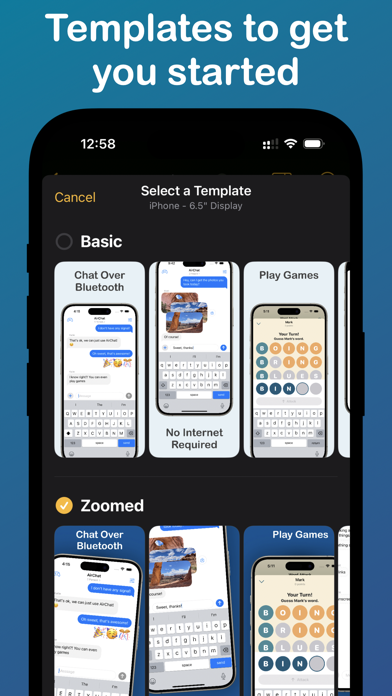
Take the headache out of generating app screenshots! 60% of users decide whether to download your app based on the screenshots. With Picasso, you can showcase your app to its fullest and increase your conversion rate. Available for iPhone, iPad, and Mac, Picasso offers everything you need to make your app stand out! ** Simple Interface ** Picasso has been optimized for Apple's platforms, taking advantage of everything your device has to offer. And with iCloud, you can edit a document on one device, and seamlessly pick it up on another. ** Device Framing ** Support for over framing 40 devices, including iPhones, iPads, Macs, and Apple Watches. Screenshots are automatically wrapped in the appropriate device frame down to the last pixel. You won't find a better app to frame your screenshots. ** Drag-and-Drop Editor ** Full drag and drop support helps streamline the editing process. ** Templates ** Choose from several templates to hit the ground running! No design skills needed. ** Easy Export ** Picasso makes exporting easy by giving you a preview of your screenshots, as well as automatic naming and ordering, making it a cinch to upload to the App Store. ** Accurate Previews ** See exactly how your screenshots will appear in the App Store, cutting out unnecessary iteration and toil. ** Power Features ** Keyboard shortcuts make navigating the app fast. -- Picasso Pro Features (In-App Purchase required) -- ** Upload Directly to App Store Connect ** Once an app is linked with an App Store Connect API Key, you can upload your screenshots directly to App Store Connect. ** Localization Support ** Simply drag an .xcstrings file into Picasso to localize your screenshots for any language! ** Add Images to Screenshots ** The ability to add any image to a screenshot. ** Gradients and Blurs ** Use captivating gradients and blurs to style your screenshots. ** Span Items across Screenshots ** Span items across multiple screenshots, and Picasso will make sure the spacing is correct. Terms of Service: https://getpicasso.com/terms Privacy Policy: https://getpicasso.com/privacy

Screenshots

Reviews

  • Buggy…

    4
    By -J-a-x-
    I really like this app in concept, the tools are good and localization features are a game changer. I used it to make all my app screenshots in 4 languages. Then I ran into bugs. The app originally exported perfectly, then after one update it exported weird distorted images, then after another update that was fixed but it exported the wrong sized, images, then that was fixed etc. There definitely isn’t enough emphasis form the developer on quality control. Then with the most recent update it crashes too frequently. I emailed the developer and only got a response after multiple months so support isn’t great either. With those caveats, I’ve gone back tossing the app because the international features are actually useful. So before you buy, know that it’s maybe not the most reliable app ver, but when it works it is nice.
  • Major bug blocks all progress

    1
    By Vandelay, Art
    The app seems great. Very easy to add screenshots, text and images. However, when I try to export my work into screenshots for App Store submission, I only get a bunch of black screens. No matter what I do, I can’t generate any screenshots. So effectively, this means the app doesn’t work. I hope the dev looks into this asap. I’ll update my review once the bug is fixed.
  • Unusable

    1
    By highviol3t
    App is entirely unusable because you can’t get past the email request screen. Even after validating my email, opening the app just asks me to do the same thing over and over and over. Super disappointing. Update: tried the recent fall 2025 version, still terrible. Seems literally nothing was updated. Can’t even select font weight. Complete junk.
  • App crashes frequently

    1
    By DevonB23
    I was building my app screenshots, pressed the markup button, app froze & crashed. Did not save my work. Very buggy app
  • Great app

    5
    By Kreloff
    They listened to feedback and now the app is working great
  • Great… when it works [EDITED]

    5
    By pecans
    Great app, it used to crash sometimes and/or my screenshot exports would have weird transparency issues going on, but I could work around it. With the new 3.3 update, I can no longer even open the app however! EDIT: v3.3.1 has fixed the crashing + my screenshots seem to export correctly now. Thank you devs!
  • Extortionate pricing

    1
    By Hasan&Laura
    This is a nice app, don’t get me wrong. Lots of nice well thought out features. I have apps with literal orders of magnitude more functionality for ORDERS OF MAGNITUDE less $. I was unable to see pricing on the website. So I downloaded it. I got hit with the paywall before taking my FIRST action. $4 / DAY! or $200 for “Lifetime” Given how folks release “Version 2” as a new app, lifetime isn’t that much of promise. I can make my own shots when compared to this price.
  • When it Works…

    2
    By Instabrit
    When it works it’s beautiful. Plenty of customizable colors and gradients to choose from. You can adjust the placements of your screenshots. Quick upload to your App Store Connect. Although it would have been nice if it used the term API instead of .p8 file. Or use both for newbies like me. What I am not enjoying is how it’s like pulling teeth to get this app to connect to your photos. I just keep getting the spinner. The one time I did get it to work I had to close out the app multiple times before it finally connected. Yes, I checked in settings to make sure it had permission. It’s really frustrating. This process is strenuous enough. Please make the app perform better! I’m trying to use it for another project. It keeps saying that my screenshots have all been downloaded. I don’t see them anywhere. Well, there are a couple of blank pages in my phones file folder, but when you click on them they just take you back to the app and that project. When I try to upload them to App Store Connect it prompts me to pay for a subscription. I’ve already paid for a month and it’s only been a week. And there doesn’t seem to be a way to log in so that I can prove that I’ve paid for my account. This app is too much trouble. I going to cancel.
  • Disappointing

    2
    By ConnectReviews
    I’m highly disappointed with the inconsistency of this app and how rarely it actually works. Deleting a screenshot almost always causes a crash, it lacks meaningful customization, and the interface feels unintuitive. Even if you manage to create a design and export it, the colors come out wrong. I recently purchased a monthly membership because of my previous good experience with Picasso, but the app has clearly gone downhill—and it’s happened fast.
  • Recently Unusable

    1
    By gdub222222
    Used the app very successfully in the past. Recently went to update some screenshots and it’s crashing in countless different areas on both Mac and iOS that I can’t finish any edits.

keyboard_arrow_up