S3 Client - Files location

S3 Client - Files location

By Anders Borum ApS

  • Category: Developer Tools
  • Release Date: 2023-06-29
  • Current Version: 2025.37
  • Adult Rating: 4+
  • File Size: 37.00 MB
  • Developer: Anders Borum ApS
  • Compatibility: Android, iOS 17.2
Score: 4.7561
4.7561
From 41 Ratings

Description

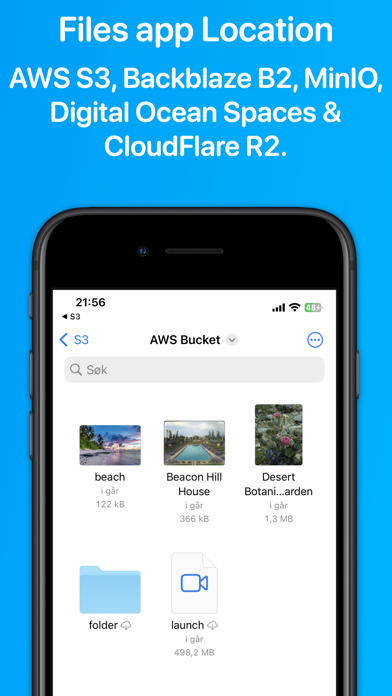
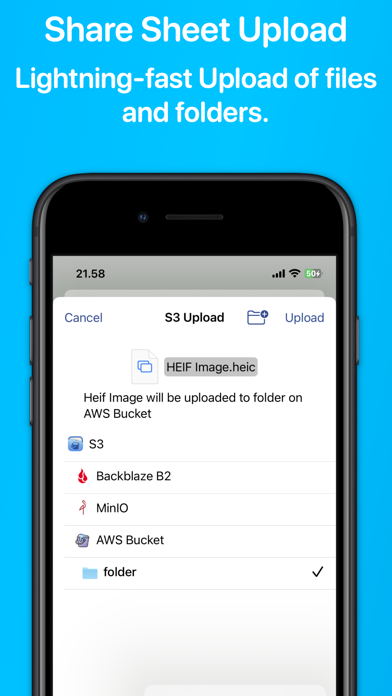
Access your S3 storage directly from the Files app, Finder, and other applications on iPhone, iPad, and Mac. Developed by the creator of Working Copy, this application provides seamless integration with S3-compatible storage services. Once configured, S3 buckets appear alongside other cloud storage providers, with files available on demand. Files are downloaded as needed and automatically synchronized back to S3 when modified. The app supports a wide range of S3-compatible services, including AWS S3, BackBlaze B2, CloudFlare R2, DigitalOcean Spaces, MinIO, and others. Files and directories can be uploaded through the system share sheet on iOS and the Services menu on macOS. The app remembers preferred upload destinations for different file types, streamlining file management. Pre-signed sharing links can be generated directly from Finder and the Files app, allowing temporary access to files for up to seven days. Support for server-side encryption with customer-provided keys (SSE-C) and client-side AES-GCM encryption compatible with the Amazon S3 Encryption Client. Comprehensive support for Shortcuts automation enables operations such as listing, downloading, uploading, and moving files. A Pro Unlock is required for most features, available as a one-time purchase or a monthly subscription, with access shared across iPhone, iPad, and Mac. A one-week free trial allows users to evaluate the app before purchase.

Screenshots

Reviews

  • Perfect Integration

    5
    By newpolluter
    Makes S3 storage as simple and seamless as Dropbox or iCloud Drive. Has become a tool I use every day!
  • Great app

    5
    By DGonzo04
    Great app and thanks for solving the error quickly
  • Works great for Cloudflare R2

    5
    By DJ Squircle
    I use it to sync between our cloudflare R2 buckets and on prem storage for video workflows and its a life saver!
  • Perfect

    5
    By gluxon
    This app is perfect! The Finder integration makes it an amazing iCloud Drive alternative for large videos. Combined with the low cost of S3 hosting offerings, this has made it easy to store large videos that I can quickly reference on my phone. Thank you for all the care and time you’ve put into this app.
  • Wonderful Tool

    5
    By jthingelstad
    I've had multiple workflows that I needed an ability to get at S3 from Shortcuts for and S3 Files is the perfect solution. I've been using it for a while and it works perfect. I've been able to save a ton of time and effort using Shortcuts to get data to S3.
  • Amazing Utility

    5
    By jthingelstad
    Being able to store and access S3 buckets from Shortcuts is a game changer for me. Saves me tons of time, and allowed me to fully automate some processes I had never been able to before. Thank you!
  • Awesome

    5
    By Yaroslav Ya
    This thing alone makes finder so good that you can delete transmit app completely.
  • Can’t seem to set permissions

    3
    By Celestialn
    Setting up was OK once I updated, but I can’t set permissions on the files I upload, which means I can’t really use the app for anything useful
  • The best I’ve found

    5
    By NamelessMasses
    I’ve tried a few other iOS/iPadOS S3 apps and this the best I’ve found especially for the price. I’ve genuinely found this developers apps to be well written. I currently use their iOS git client, WorkingCopy, and ssh client, ShellFish. I’ve run into no issues from any of these full featured apps. The developer is responsive to communication. I have no problem parting with my money to support their further work on all of these apps. 10/10 recommend.
  • Amazing app

    5
    By All12jus
    I use this app everyday for work. I always need to upload and browse files that are in an S3 bucket. This is such a streamlined workflow for it. Thanks.

keyboard_arrow_up